AI Notetaker: The Complete Guide for Teams

Your Team Spends Half Their Time in Meetings. Make That Time Count.
The average professional spends 23 hours per week in meetings. That’s more than half of a 40-hour work week talking, listening, and trying to remember what was said.
Most of those conversations vanish. The insights from a customer call, the decision made in a team sync, the commitment your colleague made last Tuesday. Just gone. Buried in someone’s memory or scattered across half-finished notes.
AI note takers change this. They capture every meeting automatically, summarize what matters, turn conversations into searchable knowledge your whole team can use, and use the information from conversations to power next steps.
This guide covers everything you need to know: what these AI meeting assistants actually do, how different teams use them, what features matter most, and how to roll one out across your company.
Best AI Notetaker Tools for Different Teams and Use Cases
Sales Teams
Problem: AEs spend hours each week on administrative work—updating CRM records, writing follow-up emails, preparing for calls by reviewing past conversations.
Solution: AI note takers automate the busywork. Call summaries sync to the CRM automatically. Follow-up emails write themselves from AI summaries. Call prep takes minutes instead of an hour.
Specific use cases:
- Auto-populate HubSpot or Salesforce with call notes and next steps
- Share winning call moments with the team for peer learning
- Review calls for coaching and deal strategy
- Search past calls to understand a prospect’s full history
Standouts:
- Grain’s live notepad and clipping feature is perfect for sales intelligence and coaching. We’re biased, but if a picture is worth 1,000 words, a clip is worth 10,000. Grain also offers stories (like Reels) that let you put a collection of clips together into a single, shareable asset, organized by insights or themes. Grain also offers a Productboard integration, Personal and Workspace Zapier integrations, and CRM auto-sync. Grain’s starter plan also works for the budget of product teams, and the limited free plan has powerful personal integrations as well.
- Fathom has a great CRM integration for HubSpot that automatically keeps your CRM in sync, including custom sales frameworks like SPICED. They also have ai features centered on coaching, like playlists. Fathom is easy to use and adopt at an affordable price.
Customer Success Teams
Problem: CSMs inherit accounts without context. They spend calls re-asking questions the customer already answered. Handoffs from sales lose critical information.
Solution: AI note taker tools create continuity. Every customer conversation is recorded and searchable. New CSMs can review the entire relationship history before their first call.
Specific use cases:
- Seamless handoffs from sales with full call history
- QBR prep using AI summaries of recent conversations
- Track customer sentiment and flag at-risk accounts
- Share customer feedback clips with product teams
Standouts:
- UpdateAI is built specifically for customer success teams. They integrate with Customer Success-specific CRMs, like Gainsight. They also provide automatic churn and expansion signals based on the contents of calls. The downside: they only offer enterprise pricing.
- Fireflies can be used for lots of use cases, and they do a good job spotting trends across many calls that can be helpful for CS use cases.
Product and Research Teams
Problem: User research generates massive amounts of qualitative data. Synthesizing insights from dozens of interviews takes weeks.
Solution: AI note takers capture interviews automatically and make them searchable. Product teams can find every time a user mentioned a specific pain point or feature request.
Specific use cases:
- Build a searchable archive of user interviews
- Share video clips of user feedback with stakeholders
- Synthesize themes across multiple interviews faster
- Document feature requests with the user’s exact words
Standouts:
- Dovetail is a dedicated research repository; it allows you to tag and code transcripts and show stakeholders exactly where users are struggling.
- Otter AI is a great reliable, no-frills note taker at a price that will work for most PMs.
Founders and Small Teams
Problem: You’re doing sales, support, and product work all at once. Conversations blur together. Critical details slip through the cracks. And you don’t have budget for expensive enterprise tools.
Solution: One AI meeting assistant covers all your meeting types. Every conversation is captured, whether it’s a sales pitch, a customer support call, or a team planning session. And with free tiers available, you can start before you have the budget.
Specific use cases:
- Never forget what a customer said when doing discovery and validation
- Share meeting context with new hires instantly
- Build institutional knowledge from day one
- Save 5+ hours per week on meeting admin
- Start free and upgrade as your team grows
Standouts:
- Granola captures notes locally and upscales them with AI. The interface is clean, the price is affordable, and setup takes seconds. Downside: no video recording.
- Grain has a free-forever plan with unlimited AI meeting notes, plus startup discounts for teams who need paid features. Unlike single-use-case tools, Grain works across your entire organization—sales, CS, and product all use the same platform—so you don’t outgrow it as you scale from founder-led to full GTM team. Grain offers unlimited video recordings and is loved by small-market teams.
Key Features to Look For
Not all AI note takers are created equal. Here’s what separates the tools that actually help from the ones that just add noise.
Summaries That Surface What Matters
Transcripts are table stakes. The real value comes from summaries that extract action items, decisions, and key points without requiring you to read through an hour of text.
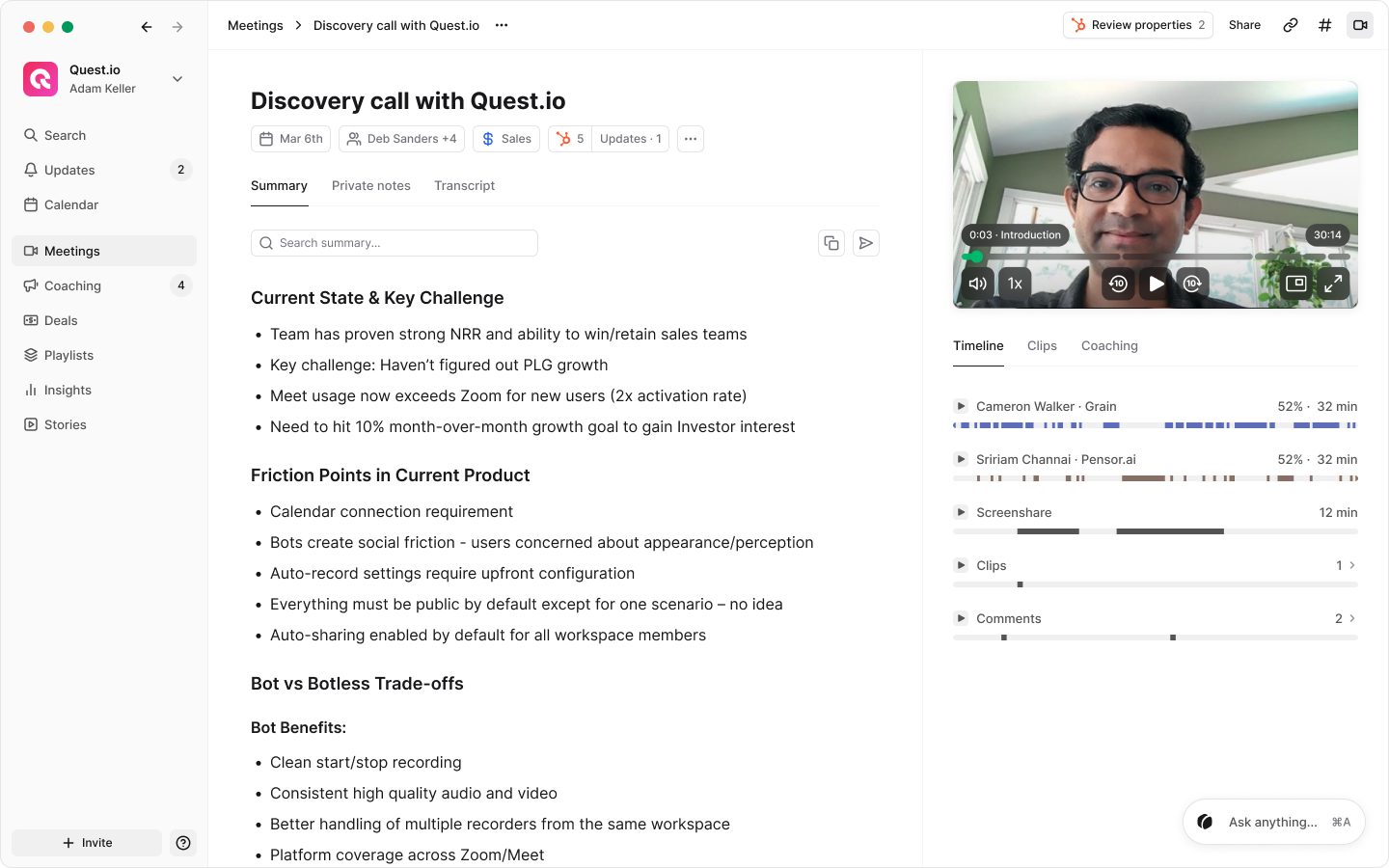
Look for tools, like Grain, that let you customize summary formats for different meeting types. A sales call summary should highlight customer pain points and next steps. A team standup meeting recap should focus on blockers, commitments, and key insights.
Video Clips, Not Just Text
Text summaries lose nuance. When a customer expresses frustration or excitement, the words on a page don’t capture the full picture.
The best AI note taker tools let you create and share video clips of specific moments. A 30-second clip of a customer describing their problem communicates more than any written summary could. Your chosen AI meeting assistant should offer unlimited video recordings.
Bot-Free Capture
“OtterPilot has joined the meeting.” “Fireflies.ai is requesting to join.” Bot-based note takers join your meeting and look like a participant. This can be awkward in customer calls. Worth it if you need the video, but sometimes not so much.
Some AI note takers, like Grain, provide the option to capture without a bot, using the desktop app to get the transcript and take notes. This also means you can use bot-free AI meeting assistants with any video conferencing tools, from Google Meet to BlueJeans.
We recommend you always get permission even when using desktop capture.
CRM and Tool Integration
Meeting notes are most valuable when they’re connected to the rest of your workflow. Look for integrations with:
- CRM systems (HubSpot, Salesforce) so call notes and highlights sync to contact and deal records automatically
- Slack so summaries post to relevant channels after meetings
- Notion, Zapier, and other tools so you can build custom workflows around your meeting data
The goal is for meeting insights to flow to where your team already works, without manual copying and pasting.
Searchable Archive
Over time, you’ll have hundreds or thousands of recorded meetings. The archive of audio recordings and video clips only becomes valuable if you can find what you need.
Look for robust search that lets you find specific topics, keywords, or moments across your entire meeting history. Bonus points for AI-powered search that understands context, not just keyword matches.
Team Organization Features
When your whole company uses the same AI note taker, organization becomes critical. You need ways to:
- Group meetings by team so sales calls don’t mix with engineering standups
- Control sharing permissions so sensitive conversations stay private
- Set default recording rules so the right meetings get captured automatically
Grain, for example, offers Teams that let admins group users and apply auto-record, auto-share, and note template settings per team. Team members can also subscribe to other teams’ recordings to access shared knowledge across the organization.
Platform Compatibility
Your AI note taker needs to work where your meetings happen. Most tools support the major platforms:
- Zoom: the most common integration, usually with the deepest feature support
- Google Meet: essential for Google Workspace teams
- Microsoft Teams: critical for enterprise environments
Some tools, like Grain, also support Webex, Slack, and in-person meetings via mobile recording. Check compatibility before committing, especially if your team uses multiple platforms.
Pricing That Makes Sense for Your Team
AI note takers range from free to enterprise pricing. The good news: you don’t need a big budget to get started.
Free tiers exist. Several AI note takers offer free plans with meaningful functionality. Grain, for example, offers a forever free plan that includes unlimited recordings and AI notes. No credit card required. This makes it easy to try before you buy and accessible for individuals, startups, and small teams watching their budget.
Paid plans are affordable. Most ai notetakers charge $15-30 per user per month for full features. At that price, the tool pays for itself if it saves each person just an hour or two per month. Given that the average professional spends 23 hours per week in meetings, the ROI is obvious. Choosing to be billed annually can bring additional discounts.
Look for flexible pricing. Some tools charge per seat, others per meeting or recording minute. For small teams, per-seat pricing usually makes more sense.
Enterprise plans add admin controls. Larger organizations need SSO, provisioning, audit logs, and compliance certifications. These features typically come with enterprise pricing, but the per-seat cost often decreases at volume.
Rolling Out AI Note Taking Company-Wide
AI note taking works best when it’s a company-wide standard, not a collection of individual tools.
Why Company-Wide Adoption Matters
When everyone uses the same AI note taker, you build a shared knowledge base. Sales calls, customer conversations, internal decisions—all searchable in one place.
It also sets cultural expectations. Recording both in-person and virtual meetings becomes normal, not awkward. Follow-ups improve across the board. Institutional knowledge accumulates instead of evaporating.
Teams using different tools (or no tools) miss these benefits. Information stays siloed. Knowledge gets lost.
Implementation Tips
Start with a pilot team. Roll out to one team first—usually sales, since they see immediate value. Let them work out the kinks and become internal champions.
Set clear recording norms. Decide which meetings should be recorded by default and communicate this to the company. External customer calls? Always. Quick 1:1s? Optional.
Configure team settings. Use team-level controls to apply appropriate recording, sharing, and note template defaults. This reduces individual setup burden and ensures consistency.
Connect to your stack. Set up CRM integrations, Slack notifications, and any custom workflows early. The tool becomes stickier when insights flow automatically to where people work.
Train on search and clips. The power of AI note takers compounds over time, but only if people use the archive. Show teams how to search past meetings and create shareable clips.
Pro Tips for Getting Maximum Value
Connect Your CRM
The biggest time savings come from automation. When meeting notes sync to HubSpot or Salesforce automatically, you eliminate hours of manual data entry.
Set up the integration early and configure which fields should auto-populate. Most teams sync: call summary, action items, and key discussion points.
Connect Your Slack
Slack is where your team already communicates, so bringing meeting insights there creates immediate visibility and action.
When you connect Grain to Slack, you can automatically share meeting summaries, clips, and key moments to relevant channels. A customer mentions a critical bug? Post the clip directly to your engineering channel. A prospect asks about a feature your team is building? Share that feedback instantly with product.
The most effective use cases:
- Deal channels: Automatically post meeting summaries to account-specific Slack channels so everyone stays aligned on customer conversations without reading through CRM notes.
- Team highlights: Create a channel for sharing winning moments—successful demos, positive customer feedback, or breakthrough discoveries—to keep the team motivated and learning from each other.
- Cross-functional updates: When support hears product feedback, when sales learns about a technical blocker, or when customer success identifies expansion opportunities, share clips to the right teams in real-time rather than waiting for the next sync meeting.
Configure your Slack integration to match your workflow. You can set up automatic posting rules or share selectively. The key is making customer insights visible where your team is already working, turning conversations into action without adding extra tools or steps.
Build Workflows with Zapier and Notion
AI note takers become more powerful when connected to other tools.
Zapier examples:
- When a meeting ends, post the summary to a Slack channel
- When action items are detected, create tasks in Asana or Monday
- When a specific keyword is mentioned, alert the relevant team
Notion examples:
- Embed meeting summaries in project documentation
- Build a searchable meeting database organized by account or project
- Link meeting notes to related documents and decisions
Search AI Summaries
Most teams underutilize the meeting archive. Make it a habit to search before meetings—especially customer calls.
“What did this customer say about pricing last quarter?” “Has anyone at this company mentioned our competitor?” The answers are in your archive. You just have to look.
Share Clips, Not Recordings
When you want someone to understand a customer conversation, don’t send them a 45-minute recording. Clip the specific 30-60 second moment that matters.
Clips get watched. Full recordings get ignored. The most effective teams build a culture of sharing clips to spread customer insights and winning moments.
Important AI Note Taker Limitations
AI meeting assistants are powerful, but they’re not magic. Know the limitations.
They don’t replace human judgment. AI summaries can miss nuance or misinterpret context. Always review summaries before sending them to customers or making decisions based on them. Treat the AI assistant as a starting point, not the final word.
Transcription isn’t perfect. Accuracy drops with heavy accents, background noise, cross talk, or domain-specific jargon. Some tools, like Grain, hit 90-95% accuracy in good conditions, but edge cases exist. Important details should be verified against the recording.
They can’t read the room. AI can transcribe what was said, but it doesn’t fully understand tone, sarcasm, or unspoken tension. A summary might say “customer asked about pricing” without capturing that the customer sounded frustrated. Human context still matters.
Recording requires consent. In many jurisdictions, you need to inform participants that a meeting is being recorded. Bot-based note takers make this obvious (the bot joins visibly). Bot-free tools record locally, which means you’re responsible for disclosure. Know your legal requirements.
They’re not a replacement for being present. AI note takers capture what was said, but they can’t replace the relationship-building that happens in conversation. Use them to reduce admin work, not to skip meetings you should attend.
What AI Features Should Your Notetaker Have?
Cross-call intelligence allows users to search for insights across entire meeting libraries, making finding recurring themes or customer trends effortless. Often, an AI assistant acts as a global search bar, enabling your team to more efficiently navigate the work that was brought up in a meeting.
Custom AI Note Templates help the AI notetaker understand if you want help with customer feedback, sales coaching assistance, or communication that is effective across team divides.
Action item extraction empowers anyone who is involved in the meeting to receive tasks and follow-ups targeted to them, eliminating guesswork. This AI feature also empowers team leads to keep themselves and their team accountable and on-track.
Send clips across teams to better share context of an insight or event. A good AI notetaker will focus on not just keeping notes, but recording and storing the audio and video so that information is not lost with the live conversation.
Frequently Asked Questions
What Is an AI Note Taker?
An AI note taker records your meetings, transcribes the conversation, and generates summaries with key points and action items. The best ones, like Grain, go further: creating shareable video clips, syncing notes to your CRM, provide coaching, and building a searchable archive of every customer conversation.
Think of it as a helpful team member who joins every meeting, takes perfect notes, never forgets anything, and can help with the post-meeting busywork.
Core capabilities include:
- Automatic recording and transcription
- AI-generated summaries with action items
- Searchable meeting archives
- Shareable highlights and clips
- Integration with CRMs, Slack, and project management tools
Do AI Note Taker Tools Work?
Here’s the reality: taking notes during a meeting means you’re not fully present in the meeting. You’re splitting attention between listening and typing, and both suffer.
AI meeting assistants eliminate this tradeoff. You stay engaged in the conversation while the tool captures everything. After the meeting, you review a summary instead of a transcript and share specific moments instead of forwarding hour-long recordings.
Some note takers, like Grain, offer the ability to jot your notes if you feel the urge to capture a thought during a meeting.
But the real value goes deeper than individual productivity by creating an organization knowledge library that improves team decision-making and execution.
The technology has matured rapidly. Modern AI note takers identify individual speakers, achieve 95%+ transcription accuracy in clear audio conditions, and pull out the information that actually matters—not just a wall of transcript text.
How long does it take to get set up?
Most AI note takers take 5-10 minutes to set up. Connect your calendar, grant recording permissions, and you’re ready for your next meeting. Team rollouts may take a bit longer—expect a couple days to a week for full deployment including integrations and training.
Is my data secure?
Reputable AI note takers, like Grain, store data in secure cloud environments, and offer admin controls for access and retention. Enterprise-grade tools provide SOC 2 compliance, SSO integration, and audit logs. Check the vendor’s security documentation for specifics.
What languages are supported?
English is universally supported with high accuracy. Many tools also support Spanish, French, German, Portuguese, and other major languages. Accuracy varies by language—English typically performs best. Grain supports over 100 languages.
Can I export my data?
Yes. Most tools let you export transcripts, summaries, and recordings. Look for export options that fit your workflow.
How do I handle meetings where someone doesn’t want to be recorded?
Respect their preference. Most AI note takers let you disable recording for specific meetings or leave the meeting and rejoin without the recorder. Establish clear norms with your team about when recording is and isn’t appropriate.
What if the AI summary gets something wrong?
Review and edit. AI summaries are a starting point, not gospel. Most tools let you edit summaries before sharing. For high-stakes meetings, always verify key details against the actual recording. Grain lets you edit both notes and transcripts.
Why not just use ChatGPT or other AI tools?
Video matters more than just text alone. A transcript captures words, but video captures tone, body language, and emotional context. When a customer hesitates before answering a pricing question, when a prospect’s eyes light up during a demo, or when a stakeholder’s expression reveals skepticism they won’t voice—these moments don’t translate to text. Shareable video clips let your team see and hear what actually happened, not just read a summary of what was said. This is especially valuable for coaching, where showing is far more effective than telling.
Plus, ChatGPT requires manual work. You’d need to record, transcribe, and paste into ChatGPT after every meeting. No automation. No integrations. No central repository. For occasional use, it works. For a team running dozens of meetings per week, it doesn’t scale.
Are there any free AI note takers?
Native meeting notes don’t integrate with your CRM, don’t create shareable video clips, and don’t build a searchable archive across your entire organization. They’re fine for personal reference. They’re not built for teams. More critically, they only work within their own platform. If your team uses Zoom for customer calls, Teams for internal meetings, and Google Meet for partner conversations, you end up with fragmented notes scattered across three different systems with no way to search or analyze patterns across all your conversations.

.png)